
Welcome to another edition of Wednesday Roundup! Last week we introduced a new theme – how to save time using an AMS. If you missed part 1, we went over membership dues, an association managers favorite to-do! Membership dues are the building blocks of a healthy association. They ensure a constant influx of revenue. But processing membership dues can be a huge pain and take a lot of time. Utilize your AMS system to automate dues reminders, generate automatic invoices and allow members to pay online. Put work in on the front end and you’ll not only save time but also increase the number of renewals.
Another way we can significantly cut down on time-consuming tasks is by enabling dynamic, integrated forms onto our website. More often than not, we meet membership managers who waste time manually transferring data from their site to an unorganized excel spreadsheet. The copy-paste method not only requires a lot of time but it also risks inaccurate data entry.
If you’re still not convinced you need to switch over to an automated system, consider this: the time you spend moving and correcting data could be spent creating awesome member experiences. Experiences that increase a member’s longevity and ties to your organization.
The Membership Application
Format and Content
The membership application is possibly the most important form on your website. But before we discuss the workflow that can save you time, let’s quickly talk content. Back in April, I wrote a post about simplifying the layout of your application. Here were the main takeaways:
- Visible – First things first, make sure your application is visible on the site. A prospect does not want to waste time searching for your form. Call it out with a big button or direct them to a specific page.
- Sectioned Format – Separate your application form into chunks. Don’t display every field on one long scrolling page. It looks like too much work (even if it isn’t) and your prospects are busy.
- Delete Unnecessary Fields – Walk through the application yourself. Do you really need Field X or Field Y? If you’re not using the data and it doesn’t add value to a member’s profile, remove it.
Workflow
Now that you’ve configured the application with everything you need, made it easily accessible to members, and thought through the content, how can you optimize the workflow to save you time? If you’re using an AMS system like AMO, the platform should come with a dynamic, integrated application. That means once a member clicks submit, their name, information, membership level, and payment is automatically entered into the database. No more copy and paste.
The Event Registration Form
Organization
Membership dues are most likely the #1 revenue generator, but for a lot of groups, event revenue comes in a close second. Considering this, it’s important to optimize your event registration form. Just like the membership application, this form needs to be easily accessible, properly laid out, and ideally, integrated into your database.
Look for the event module in your AMS platform. Configure your registration form to include member vs. non-member pricing and split up activities into groupings to keep everything organized. See how we organize our registration form in AMO’s event module below. 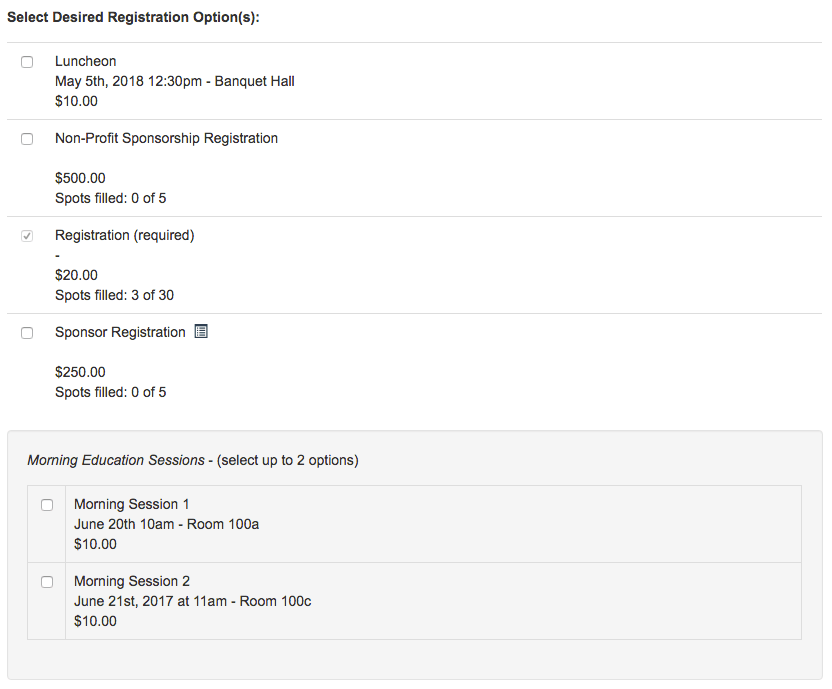
Prepopulate Member Forms
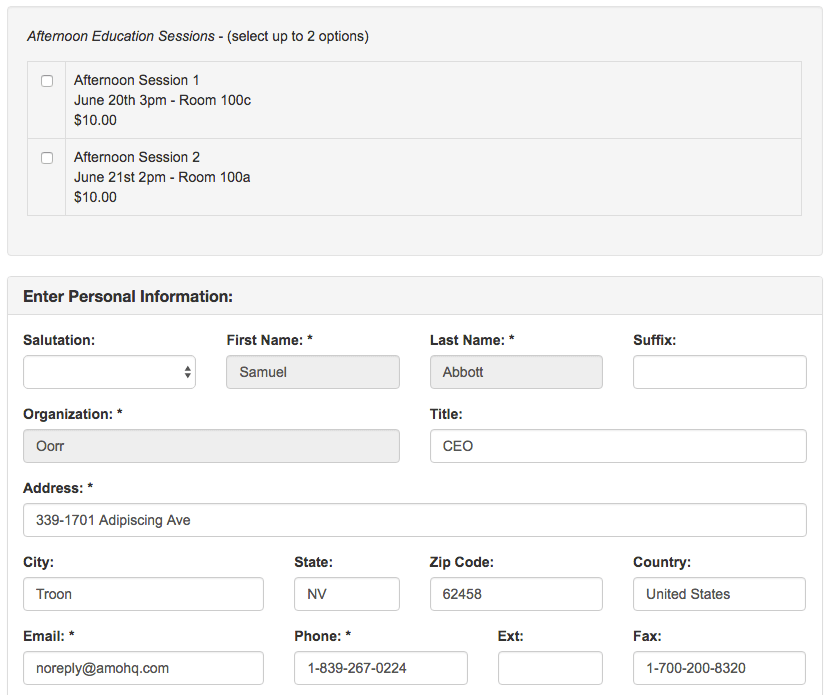
In the screenshot above, you’ll also notice that the contact fields are already filled in even before a member makes a selection. This small addition in the workflow may not seem like much but saving members time is always a way to delight.
When you save yourself time, you’re probably helping your members too. It’s a win-win! If you’re not already using an AMS, test out AMO for 30 days free! No CC required.