

As our world becomes increasingly more digital, it’s important to develop marketing strategies that serve commonly used devices – namely, smartphones. Lisa Hirst Carnes, our VP of Marketing at ArcStone, wrote an interesting post on developing a content strategy with mobile users in mind. “Nearly half of all internet users are accessing content from a mobile device,” stated Carnes, according to a study by SmartInsights. With this statistic in mind, it’s evident our strategies need to consider the mobile experience.
Analyze the Analytics: % of Mobile Participants
To know exactly how many people are accessing your content via a mobile device, Carnes advises checking your Google Analytics account. Simply click Audience >> Mobile. This will give you an accurate representation of device preference.
Now that you’re armed with the facts, what do you do? How can you use these metrics to develop a successful online strategy? Carnes breaks it down with 3 best practices. Let’s check them out below.
Best Practices for an Association’s Mobile Strategy
1. It’s all about the headlines
Your website visitors have an average attention span of 8 seconds says a 2015 study by Microsoft.
How can we quickly grab their attention and entice them to stay? Carnes says to start with bold, clear headlines. Avoid dense industry jargon and make your text stand out with large, bold font. The average mobile visitor is probably more distracted than a desktop viewer so be thoughtful with your screen real estate.
2. How to please the eye with imagery and layout
Once you’ve drawn them in with your catchy headline, follow it up with short paragraphs with ample white space and images. Start each paragraph with a sentence that sums up the block of text. If the reader is skimming, they may only read the first line and you want it to stick.
“Images hold a lot of power, especially with mobile: research shows that mobile users look at images more than they look at text,” says Carnes. Imagery helps the flow of your post and helps break up the text. Be mindful, however, about the images you choose and where they’re placed. Randomly adding photos may seem visually appealing but if they don’t fit within the context, they could confuse the reader.
Carnes shared this example from Food52, a popular food recipe site. The images complement the headlines and make the reader want more.
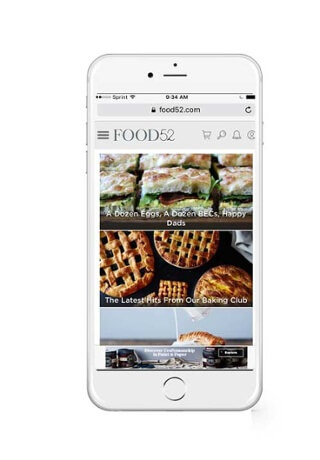
Image Credit: ArcStone
3. Nix the intrusive pop-ups
Don’t cover up content with intrusive full page popups. Carnes noted that “Google ranks mobile websites that use intrusive interstitials lower than other sites where content is easily accessible”. Popups and CTAs are fine (and necessary for marketing strategies), just be sure to think through timing and placement.
Creating mobile friendly content doesn’t have to be difficult. Bring it back to basics. What does your audience want to see and how will they see it (desktop vs. tablet vs. mobile)? Start by answering these questions.
Know you need help but don’t have time to make the changes? Let us help! Contact me at aketcham@arcstone.com and I’ll put you in touch with our team of digital strategists.

Interested in the AMO Mobile App?
Sign Up to watch a recording of the Live Demo Webinar and receive a link to the Interactive Mobile App Prototype!